1.3 Using a class
- Make sure the Solution Explorer is visible on the left side.
- Go to
Program.cs. - Create the
Mainmethod. -
You will now see the following:
1
2
3
4
5
6
7
8
9
namespace Geometry
{
    internal class Program
    {
        static void Main(string[] args)
        {
        }
    }
}
You can now use the
Circleclass in your program. -
Type
Circle myFirstCircle = new Circle(); -
Your screen will look like this:
 1
 2
 3
 4
 5
 6
 7
 8
 9
10
11
12
13
using Geometry.Models; using System; namespace Geometry { internal class Program { static void Main(string[] args) { Circle myFirstCircle = new Circle(); } } }- The
Circleclass is automatically imported because this class is needed to execute the code. Circle myFirstCircletells the compiler that you are declaring an object of theCircleclass with the namemyFirstCircle.myFirstCircleis the reference variable.- This object does not exist yet. The object is instantiated by the
newkeyword. - Once the entire line is executed, you have a new object of the
Circleclass that you can access via the variablemyFirstCircle.
- The
-
Type the following under the line you just entered:
myFirstCirclefollowed by a period.You will then see the following:
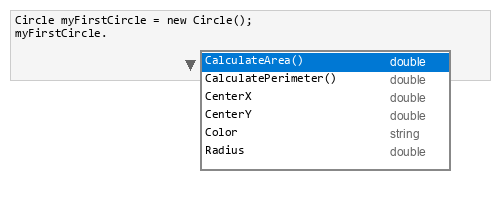
All attributes and methods in the
Circleclass are now available. You can modify and read the attributes and call the methods. -
Make sure your
Mainmethod looks like this:1 2 3 4 5 6 7 8 9 10 11
static void Main(string[] args) { Circle myFirstCircle = new Circle(); myFirstCircle.Radius = 3; myFirstCircle.CenterX = 3; myFirstCircle.CenterY = -2; myFirstCircle.Color = "green"; Console.WriteLine(myFirstCircle.CalculatePerimeter()); Console.WriteLine(myFirstCircle.CalculateArea()); } -
Run your program. Your output will look like this:
1
2
18.84955592153876 28.274333882308138 -
Try some other values and view the output.