6.4 The Surface class
-
Create a new class
Surfaceaccording to the code below:1 2 3 4 5 6 7 8 9 10 11 12 13 14 15 16 17 18 19 20 21 22 23 24 25 26 27 28 29 30 31 32 33 34
namespace Geometry.Models { public class Surface { private double _length; private double _width; public List<Shape> MyShapes; public Surface(double length, double width) { _length = length; _width = width; MyShapes = new List<Shape>(); } public void AddShape(Shape shape) { MyShapes.Add(shape); } public override string ToString() { string result = ""; if (MyShapes.Count > 0) { foreach (Shape shape in MyShapes) { result += shape.ToString() + "\n\n"; } } return result; } } }- In this class, a
List<Shape>is created of the abstract classShape. - The
AddShape()method only knows the abstract classShape. - The
ToString()method calls theToString()method of the objects in the list.
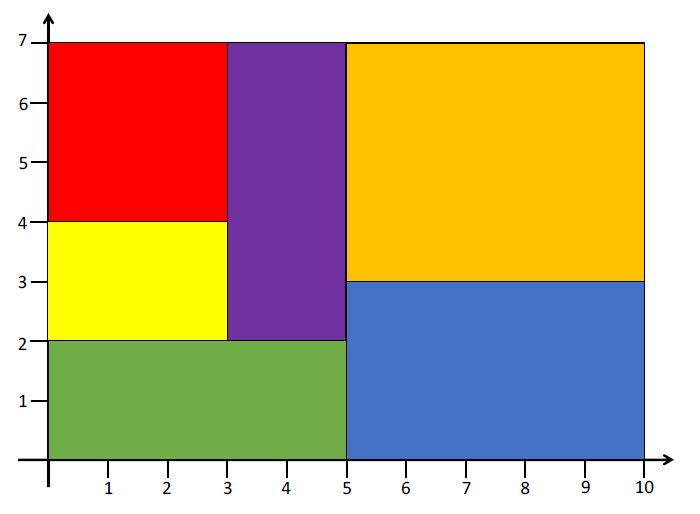
The surface is filled according to the diagram below:
- In this class, a
-
Add the following code to your
Mainmethod:1 2 3 4 5 6 7 8
Surface surface = new Surface(10, 7); surface.AddShape(new Rectangle(3, 3, new Point(0, 7), "red")); surface.AddShape(new Rectangle(3, 2, new Point(0, 4), "yellow")); surface.AddShape(new Rectangle(5, 2, new Point(0, 2), "green")); surface.AddShape(new Rectangle(2, 5, new Point(3, 7), "purple")); surface.AddShape(new Rectangle(5, 4, new Point(5, 7), "orange")); surface.AddShape(new Rectangle(5, 3, new Point(5, 3), "blue")); Console.WriteLine(surface); -
Run your program. The output shows the information for each shape.
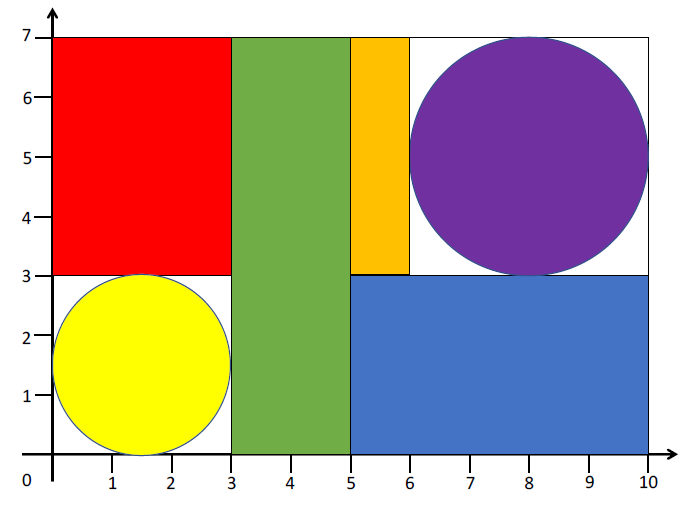
Below you fill the following surface:
-
Add the following code and run your program:
1
2
3
4
5
6
7
8
Surface surface2 = new Surface(10, 7);
surface2.AddShape(new Rectangle(3, 4, new Point(0, 7), "red"));
surface2.AddShape(new Circle(1.5, new Point(1.5, 1.5), "yellow"));
surface2.AddShape(new Rectangle(2, 7, new Point(3, 7), "green"));
surface2.AddShape(new Rectangle(1, 4, new Point(5, 7), "orange"));
surface2.AddShape(new Circle(2, new Point(8, 5), "purple"));
surface2.AddShape(new Rectangle(5, 3, new Point(5, 3), "blue"));
Console.WriteLine(surface2);
The output shows the correct information for each shape.